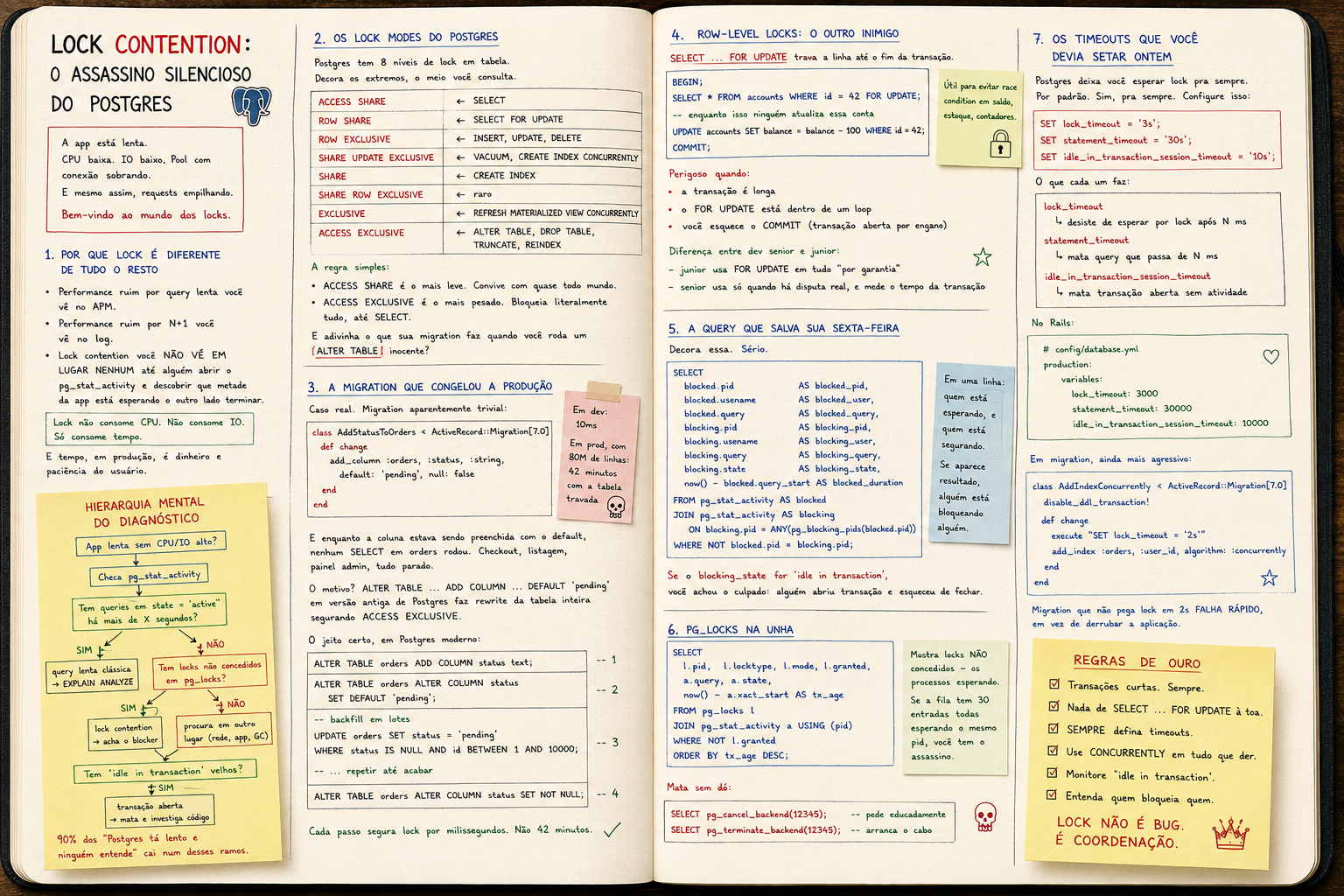
Lock contention: the silent killer in PostgreSQL
A 10ms migration that freezes production for 40 minutes. ALTER TABLE grabbing ACCESS EXCLUSIVE. pg_locks + pg_stat_activity. Locks are invisible — until they aren't.
Lock contention: the silent killer in PostgreSQL
The app is slow.
CPU low. IO low. Pool with connections to spare.
And still, requests piling up.
Welcome to the world of locks.
Why locks are different from everything else
Slowness from a slow query you see in the APM.
Slowness from N+1 you see in the log.
Lock contention you don't see anywhere until someone opens pg_stat_activity and finds out half the app is waiting on the other half to finish.
Locks don't consume CPU. They don't consume IO. They only consume time.
And time, in production, is money and the user's patience.
The Postgres lock modes
Postgres has 8 table-level lock modes. Memorize the extremes, look up the middle.
ACCESS SHARE              ← SELECT
ROW SHARE                 ← SELECT FOR UPDATE
ROW EXCLUSIVE             ← INSERT, UPDATE, DELETE
SHARE UPDATE EXCLUSIVE    ← VACUUM, CREATE INDEX CONCURRENTLY
SHARE                     ← CREATE INDEX
SHARE ROW EXCLUSIVE       ← rare
EXCLUSIVE                 ← REFRESH MATERIALIZED VIEW CONCURRENTLY
ACCESS EXCLUSIVE          ← ALTER TABLE, DROP TABLE, TRUNCATE, REINDEX
The simple rule:
ACCESS SHAREis the lightest. Coexists with almost everyone.ACCESS EXCLUSIVEis the heaviest. Blocks literally everything, evenSELECT.
And guess what your migration does when you run an innocent ALTER TABLE?
The migration that froze production
Real case. Migration that looks trivial:
class AddStatusToOrders < ActiveRecord::Migration[7.0]
  def change
    add_column :orders, :status, :string, default: 'pending', null: false
  end
end
In dev: 10ms.
In prod, with 80M rows: 42 minutes with the table locked.
And while the column was being backfilled with the default, no SELECT on orders ran. Checkout, listings, admin panel — all stopped.
The reason? ALTER TABLE ... ADD COLUMN ... DEFAULT 'pending' on older Postgres rewrites the whole table while holding ACCESS EXCLUSIVE.
The right way, on modern Postgres:
ALTER TABLE orders ADD COLUMN status text;
ALTER TABLE orders ALTER COLUMN status SET DEFAULT 'pending';
-- backfill in batches
UPDATE orders SET status = 'pending' WHERE status IS NULL AND id BETWEEN 1 AND 10000;
-- ...
ALTER TABLE orders ALTER COLUMN status SET NOT NULL;
Each step holds the lock for milliseconds. Not 42 minutes.
Row-level locks: the other enemy
SELECT ... FOR UPDATE locks the row until the transaction ends.
BEGIN;
SELECT * FROM accounts WHERE id = 42 FOR UPDATE;
-- meanwhile nobody else updates this account
UPDATE accounts SET balance = balance - 100 WHERE id = 42;
COMMIT;
Useful to avoid race conditions on balances, stock, counters.
Dangerous when:
- the transaction is long
- the
FOR UPDATElives inside a loop - you forget the
COMMIT(transaction left open by accident)
Difference between senior and junior:
- junior uses
FOR UPDATEeverywhere "just in case" - senior uses it only where there's real contention, and times the transaction
The query that saves your Friday
Memorize this one. Seriously.
SELECT
  blocked.pid           AS blocked_pid,
  blocked.usename       AS blocked_user,
  blocked.query         AS blocked_query,
  blocking.pid          AS blocking_pid,
  blocking.usename      AS blocking_user,
  blocking.query        AS blocking_query,
  blocking.state        AS blocking_state,
  now() - blocked.query_start AS blocked_duration
FROM pg_stat_activity AS blocked
JOIN pg_stat_activity AS blocking
  ON blocking.pid = ANY(pg_blocking_pids(blocked.pid))
WHERE NOT blocked.pid = blocking.pid;
One row: who's waiting, who's holding.
If anything shows up, somebody is blocking somebody.
If blocking_state is idle in transaction, you found your culprit: somebody opened a transaction and forgot to close it.
pg_locks by hand
SELECT
  l.pid,
  l.locktype,
  l.mode,
  l.granted,
  a.query,
  a.state,
  now() - a.xact_start AS tx_age
FROM pg_locks l
JOIN pg_stat_activity a USING (pid)
WHERE NOT l.granted
ORDER BY tx_age DESC;
Shows ungranted locks — i.e., processes waiting.
If the queue has 30 entries all waiting on the same pid, you have your killer.
Kill without mercy:
SELECT pg_cancel_backend(12345);    -- asks politely
SELECT pg_terminate_backend(12345); -- yanks the cable
The timeouts you should have set yesterday
Postgres lets you wait for a lock forever. By default. Yes, forever.
Configure this:
SET lock_timeout = '3s';
SET statement_timeout = '30s';
SET idle_in_transaction_session_timeout = '10s';
What each does:
lock_timeout
  └── give up waiting for a lock after N ms

statement_timeout
  └── kill a query running longer than N ms

idle_in_transaction_session_timeout
  └── kill an open transaction with no activity
In Rails:
# config/database.yml
production:
  variables:
    lock_timeout: 3000
    statement_timeout: 30000
    idle_in_transaction_session_timeout: 10000
In migrations, even more aggressive:
class AddIndexConcurrently < ActiveRecord::Migration[7.0]
  disable_ddl_transaction!

  def change
    execute "SET lock_timeout = '2s'"
    add_index :orders, :user_id, algorithm: :concurrently
  end
end
A migration that can't grab the lock in 2s fails fast, instead of taking the app down.
Mental hierarchy for diagnosis
App slow but no CPU/IO?
   ↓
Check pg_stat_activity
   ↓
Queries with state = 'active' for more than X seconds?
   ├── yes → classic slow query → EXPLAIN ANALYZE
   └── no
       ↓
Any ungranted locks in pg_locks?
   ├── yes → lock contention → find the blocker
   └── no → look elsewhere (network, app, GC)

Old 'idle in transaction' sessions?
   └── yes → open transaction → kill it and check the code
90% of "Postgres is slow and nobody understands why" lands on one of these branches.
Classic sins
1. ALTER TABLE without lock_timeout.
You think it'll take 1s. It doesn't. The table locks. Everything locks.
2. Rails transaction holding a lock while calling an external API.
Order.transaction do
  order.lock!
  PaymentGateway.charge(order)  # 8s of HTTP
  order.update!(paid: true)
end
For 8s, nobody touches this order. Worse: the pool connection is hostage too.
3. Migration combining ADD COLUMN NOT NULL DEFAULT on a big table.
We've seen it. Don't.
4. CREATE INDEX instead of CREATE INDEX CONCURRENTLY.
The first blocks writes on the table. The second doesn't.
5. A worker that does SELECT FOR UPDATE and processes slowly.
The row stays hostage for the entire job duration.
The correct workflow for schema changes in production
1. Assess impact (table size, traffic)
   ↓
2. Break into small steps (ADD, BACKFILL in batches, NOT NULL)
   ↓
3. Always SET lock_timeout before DDL
   ↓
4. CREATE INDEX CONCURRENTLY, always
   ↓
5. Run during off-peak
   ↓
6. Have a rollback plan
   ↓
7. Monitor pg_locks DURING the migration
Not paranoia. The bare minimum.
Conclusion
Lock contention is the kind of problem that:
- doesn't show up in the APM
- doesn't show up in CPU/memory metrics
- only shows up when somebody opens
pg_stat_activity
The difference between senior and junior here is brutal:
- junior debugs by reading the application log
- senior opens
pg_locksin 30 seconds
Learn the lock modes. Set the timeouts. Treat DDL like surgery.
Locks are invisible until they aren't.
And when they aren't, it's usually in production, Friday night.